

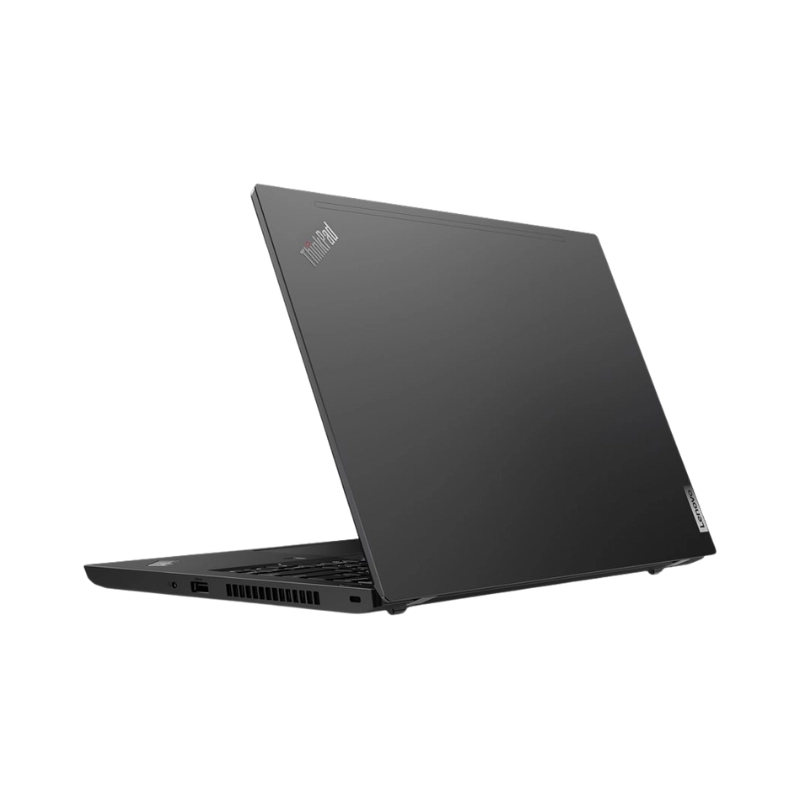
The Lenovo ThinkPad L14 Gen 2 Ryzen 3 PRO 5450U with 8GB RAM and 256GB NVMe SSD is a dependable business laptop designed for professionals, students, teachers, freelancers and office users who need reliable performance in a durable and portable design.
Available at Warsi Computers, the ThinkPad L14 Gen 2 combines a quad-core AMD Ryzen 3 PRO processor, 8GB DDR4 memory, fast PCIe NVMe SSD storage and integrated AMD Radeon graphics. This configuration is suitable for Microsoft Office, online meetings, business applications, web browsing, research, programming and everyday multitasking.
The exact processor name is AMD Ryzen 3 PRO 5450U, not the standard Ryzen 3 5450U. It provides four cores, eight threads, a 2.6GHz base frequency, speeds of up to 4.0GHz and integrated AMD Radeon graphics.
Its compact 14-inch body, renowned ThinkPad keyboard, useful business connectivity and upgradeable memory make it a practical choice for work, study and everyday professional use.
The Lenovo ThinkPad L14 Gen 2 features a clean, practical and business-focused design suitable for offices, universities, shops, classrooms and remote work environments.
Its compact 14-inch form factor provides a useful balance between screen size and portability. Lenovo lists the starting weight at approximately 1.59kg, although the exact weight can vary with the configuration.
The laptop is suitable for:
The classic black ThinkPad body offers a professional appearance that works well in corporate and educational environments.
The Lenovo ThinkPad L14 Gen 2 is powered by the AMD Ryzen 3 PRO 5450U processor.
Its key processor specifications include:
These specifications make the Ryzen 3 PRO 5450U suitable for everyday productivity, business applications and efficient multitasking.
The processor can comfortably handle:
The four-core, eight-thread design provides better multitasking capability than older entry-level dual-core business processors.
The installed 8GB DDR4 RAM provides suitable performance for office work, study, web browsing and everyday multitasking.
Benefits of 8GB RAM include:
The ThinkPad L14 Gen 2 AMD platform uses DDR4-3200 memory, includes two SODIMM slots and officially supports configurations of up to 64GB. This gives users useful upgrade potential for future requirements.
Before advertising an available memory slot, check whether the installed 8GB is configured as one 8GB module or two 4GB modules.
The built-in 256GB PCIe NVMe SSD provides fast startup, responsive application loading and quick access to files.
Benefits of NVMe SSD storage include:
The ThinkPad L14 Gen 2 supports M.2 PCIe NVMe storage, with Lenovo listing support for one M.2 2242 or M.2 2280 SSD depending on configuration.
The 256GB capacity is suitable for:
Users with large video, photo or project libraries may require external storage, cloud storage or a larger compatible SSD.
The Lenovo ThinkPad L14 Gen 2 features a compact 14-inch anti-glare display suitable for office work, study and everyday use.
Lenovo offered several display configurations, including:
Brightness and colour coverage also vary between configurations. Therefore, do not automatically describe the laptop as Full HD, IPS or touchscreen until the physical unit is checked.
The screen is useful for:
The anti-glare surface helps reduce reflections while working under indoor office or classroom lighting.
This configuration uses integrated AMD Radeon graphics with shared system memory.
Lenovo lists integrated AMD Radeon graphics as the graphics solution across the ThinkPad L14 Gen 2 AMD platform.
The integrated graphics are suitable for:
This laptop is designed primarily for business productivity rather than demanding gaming, advanced 3D rendering or professional video production.
The Lenovo ThinkPad L14 Gen 2 includes a six-row, spill-resistant keyboard with multimedia and communication controls.
Depending on the configuration, the keyboard may be:
The laptop also includes Lenovo’s signature TrackPoint and a multi-touch touchpad.
The keyboard is suitable for:
Confirm keyboard backlighting from the physical unit before adding it to the product title or description.
The Lenovo ThinkPad L14 Gen 2 provides a strong selection of ports for office accessories, external displays, wired networks and storage devices.
Standard ports include:
Both USB-C ports support data transfer, charging and DisplayPort output, although their maximum transfer speeds differ.
These connections allow users to attach:
The built-in Ethernet port is particularly useful for businesses requiring stable wired network connectivity.
The ThinkPad L14 Gen 2 AMD platform was offered with Wi-Fi 6 and Bluetooth connectivity through several compatible wireless-card configurations. Some selected models also supported Wi-Fi 6E hardware.
Wireless connectivity is useful for:
The exact wireless card and Bluetooth version should be checked from the available unit.
Lenovo offered the ThinkPad L14 Gen 2 with:
The exact camera type depends on the configuration.
These features make the laptop suitable for:
Confirm whether the physical unit includes the standard HD camera or the optional infrared camera.
The Lenovo ThinkPad L14 Gen 2 includes business-focused security options such as TPM 2.0 and a physical camera privacy shutter.
Depending on configuration, it may also include:
The fingerprint reader, infrared camera and smart-card reader were optional, so they must be confirmed before being added to the listing.
The ThinkPad L14 Gen 2 AMD platform uses an integrated 45Wh battery and supports Rapid Charge with a compatible 65W adapter.
Lenovo states that Rapid Charge can restore up to 80% capacity in approximately one hour under supported conditions. Real-world battery timing depends on battery health, screen brightness, software and usage.
Because this product may be sold as a used or imported business laptop, always confirm:
Do not advertise Lenovo’s original maximum battery test result as the expected backup of a used unit.
The Lenovo ThinkPad L14 Gen 2 is a practical business laptop for:
Its compact design, Ethernet port, comfortable keyboard and upgradeable memory make it suitable for offices and small businesses.
Students and teachers can use the ThinkPad L14 Gen 2 for:
The 14-inch size makes it easier to carry between home, university, college or office compared with larger 15.6-inch laptops.
The Lenovo ThinkPad L14 Gen 2 can support common freelance work, including:
Its Ryzen 3 PRO processor, 8GB RAM and NVMe SSD provide dependable performance for browser-based and productivity-focused freelance work.
The four-core Ryzen processor and upgradeable memory make this laptop suitable for entry-level development and computer-science learning.
It can be used with:
Heavy Android emulators, multiple virtual machines, large Docker environments or advanced software projects may require additional memory and a more powerful processor.
The ThinkPad L14 Gen 2 provides good upgrade flexibility for a compact business laptop.
The platform supports:
These specifications give users the option to increase memory or storage as their requirements grow.
Compatibility and available slots should always be checked before promising an upgrade.
Lenovo lists the ThinkPad L14 Gen 2 as having passed MIL-STD-810H testing. This refers to platform testing under specified environmental conditions and should not be interpreted as making the laptop damage-proof.
Its business-oriented construction makes it suitable for regular office, university and professional use.
Buy the Lenovo ThinkPad L14 Gen 2 Ryzen 3 PRO 5450U with 8GB RAM and 256GB NVMe SSD in Pakistan from Warsi Computers.
This compact business laptop is a strong option for customers looking for dependable office performance, fast SSD storage, useful connectivity and future memory upgrade potential.
Customers in Islamabad, Rawalpindi and other cities across Pakistan can contact Warsi Computers for the latest Lenovo ThinkPad L14 Gen 2 price in Pakistan, display resolution, keyboard features, battery health, physical condition, warranty and stock availability.
| Feature | Details |
|---|---|
| Product Name | Lenovo ThinkPad L14 Gen 2 |
| Brand | Lenovo |
| Series | ThinkPad L |
| Product Type | Business Laptop |
| Processor | AMD Ryzen 3 PRO 5450U |
| Processor Cores | 4 Cores |
| Processor Threads | 8 Threads |
| Base Frequency | 2.6GHz |
| Maximum Frequency | Up to 4.0GHz |
| Processor Cache | 2MB L2 and 8MB L3 |
| RAM | 8GB DDR4 |
| Memory Speed | DDR4-3200 |
| Maximum RAM | Up to 64GB |
| Memory Slots | Two SODIMM Slots |
| Storage | 256GB SSD |
| Storage Type | PCIe NVMe M.2 SSD |
| Graphics | Integrated AMD Radeon Graphics |
| Dedicated Graphics | No |
| Display Size | 14-inch |
| Display Resolution | Confirm from physical unit |
| Display Type | HD TN or Full HD IPS — confirm from unit |
| Touchscreen | Confirm from unit |
| Keyboard | Spill-Resistant ThinkPad Keyboard |
| Keyboard Backlight | Confirm from unit |
| Pointing Device | TrackPoint and Multi-Touch Touchpad |
| Webcam | 720p HD or HD + IR — confirm from unit |
| Camera Privacy Shutter | Supported |
| USB-A Ports | Two USB 3.2 Gen 1 |
| USB-C Ports | Two USB-C Ports |
| Display Output | HDMI 2.0 and USB-C DisplayPort |
| Wired Network | RJ-45 Gigabit Ethernet |
| Card Reader | MicroSD Card Reader |
| Wireless Connectivity | Wi-Fi and Bluetooth |
| Fingerprint Reader | Confirm from unit |
| Battery | Integrated 45Wh |
| Charging | USB-C Charging |
| Colour | Black |
| Operating System | Confirm installed version |
| Recommended Use | Office, Study, Freelancing and Everyday Computing |
| Condition | Confirm according to available stock |
| Warranty | Confirm according to available stock |
| Brand | Lenovo |
|---|---|
| RAM | 8GB |
| Storage | 256 GB |
| CPU | Ryzen 3 Pro |
₨ 46,000
₨ 46,000
The Lenovo ThinkPad L14 Gen 2 Ryzen 3 PRO 5450U with 8GB RAM and 256GB NVMe SSD is a dependable business laptop designed for professionals, students, teachers, freelancers and office users who need reliable performance in a durable and portable design.
Available at Warsi Computers, the ThinkPad L14 Gen 2 combines a quad-core AMD Ryzen 3 PRO processor, 8GB DDR4 memory, fast PCIe NVMe SSD storage and integrated AMD Radeon graphics. This configuration is suitable for Microsoft Office, online meetings, business applications, web browsing, research, programming and everyday multitasking.
The exact processor name is AMD Ryzen 3 PRO 5450U, not the standard Ryzen 3 5450U. It provides four cores, eight threads, a 2.6GHz base frequency, speeds of up to 4.0GHz and integrated AMD Radeon graphics.
Its compact 14-inch body, renowned ThinkPad keyboard, useful business connectivity and upgradeable memory make it a practical choice for work, study and everyday professional use.
The Lenovo ThinkPad L14 Gen 2 features a clean, practical and business-focused design suitable for offices, universities, shops, classrooms and remote work environments.
Its compact 14-inch form factor provides a useful balance between screen size and portability. Lenovo lists the starting weight at approximately 1.59kg, although the exact weight can vary with the configuration.
The laptop is suitable for:
The classic black ThinkPad body offers a professional appearance that works well in corporate and educational environments.
The Lenovo ThinkPad L14 Gen 2 is powered by the AMD Ryzen 3 PRO 5450U processor.
Its key processor specifications include:
These specifications make the Ryzen 3 PRO 5450U suitable for everyday productivity, business applications and efficient multitasking.
The processor can comfortably handle:
The four-core, eight-thread design provides better multitasking capability than older entry-level dual-core business processors.
The installed 8GB DDR4 RAM provides suitable performance for office work, study, web browsing and everyday multitasking.
Benefits of 8GB RAM include:
The ThinkPad L14 Gen 2 AMD platform uses DDR4-3200 memory, includes two SODIMM slots and officially supports configurations of up to 64GB. This gives users useful upgrade potential for future requirements.
Before advertising an available memory slot, check whether the installed 8GB is configured as one 8GB module or two 4GB modules.
The built-in 256GB PCIe NVMe SSD provides fast startup, responsive application loading and quick access to files.
Benefits of NVMe SSD storage include:
The ThinkPad L14 Gen 2 supports M.2 PCIe NVMe storage, with Lenovo listing support for one M.2 2242 or M.2 2280 SSD depending on configuration.
The 256GB capacity is suitable for:
Users with large video, photo or project libraries may require external storage, cloud storage or a larger compatible SSD.
The Lenovo ThinkPad L14 Gen 2 features a compact 14-inch anti-glare display suitable for office work, study and everyday use.
Lenovo offered several display configurations, including:
Brightness and colour coverage also vary between configurations. Therefore, do not automatically describe the laptop as Full HD, IPS or touchscreen until the physical unit is checked.
The screen is useful for:
The anti-glare surface helps reduce reflections while working under indoor office or classroom lighting.
This configuration uses integrated AMD Radeon graphics with shared system memory.
Lenovo lists integrated AMD Radeon graphics as the graphics solution across the ThinkPad L14 Gen 2 AMD platform.
The integrated graphics are suitable for:
This laptop is designed primarily for business productivity rather than demanding gaming, advanced 3D rendering or professional video production.
The Lenovo ThinkPad L14 Gen 2 includes a six-row, spill-resistant keyboard with multimedia and communication controls.
Depending on the configuration, the keyboard may be:
The laptop also includes Lenovo’s signature TrackPoint and a multi-touch touchpad.
The keyboard is suitable for:
Confirm keyboard backlighting from the physical unit before adding it to the product title or description.
The Lenovo ThinkPad L14 Gen 2 provides a strong selection of ports for office accessories, external displays, wired networks and storage devices.
Standard ports include:
Both USB-C ports support data transfer, charging and DisplayPort output, although their maximum transfer speeds differ.
These connections allow users to attach:
The built-in Ethernet port is particularly useful for businesses requiring stable wired network connectivity.
The ThinkPad L14 Gen 2 AMD platform was offered with Wi-Fi 6 and Bluetooth connectivity through several compatible wireless-card configurations. Some selected models also supported Wi-Fi 6E hardware.
Wireless connectivity is useful for:
The exact wireless card and Bluetooth version should be checked from the available unit.
Lenovo offered the ThinkPad L14 Gen 2 with:
The exact camera type depends on the configuration.
These features make the laptop suitable for:
Confirm whether the physical unit includes the standard HD camera or the optional infrared camera.
The Lenovo ThinkPad L14 Gen 2 includes business-focused security options such as TPM 2.0 and a physical camera privacy shutter.
Depending on configuration, it may also include:
The fingerprint reader, infrared camera and smart-card reader were optional, so they must be confirmed before being added to the listing.
The ThinkPad L14 Gen 2 AMD platform uses an integrated 45Wh battery and supports Rapid Charge with a compatible 65W adapter.
Lenovo states that Rapid Charge can restore up to 80% capacity in approximately one hour under supported conditions. Real-world battery timing depends on battery health, screen brightness, software and usage.
Because this product may be sold as a used or imported business laptop, always confirm:
Do not advertise Lenovo’s original maximum battery test result as the expected backup of a used unit.
The Lenovo ThinkPad L14 Gen 2 is a practical business laptop for:
Its compact design, Ethernet port, comfortable keyboard and upgradeable memory make it suitable for offices and small businesses.
Students and teachers can use the ThinkPad L14 Gen 2 for:
The 14-inch size makes it easier to carry between home, university, college or office compared with larger 15.6-inch laptops.
The Lenovo ThinkPad L14 Gen 2 can support common freelance work, including:
Its Ryzen 3 PRO processor, 8GB RAM and NVMe SSD provide dependable performance for browser-based and productivity-focused freelance work.
The four-core Ryzen processor and upgradeable memory make this laptop suitable for entry-level development and computer-science learning.
It can be used with:
Heavy Android emulators, multiple virtual machines, large Docker environments or advanced software projects may require additional memory and a more powerful processor.
The ThinkPad L14 Gen 2 provides good upgrade flexibility for a compact business laptop.
The platform supports:
These specifications give users the option to increase memory or storage as their requirements grow.
Compatibility and available slots should always be checked before promising an upgrade.
Lenovo lists the ThinkPad L14 Gen 2 as having passed MIL-STD-810H testing. This refers to platform testing under specified environmental conditions and should not be interpreted as making the laptop damage-proof.
Its business-oriented construction makes it suitable for regular office, university and professional use.
Buy the Lenovo ThinkPad L14 Gen 2 Ryzen 3 PRO 5450U with 8GB RAM and 256GB NVMe SSD in Pakistan from Warsi Computers.
This compact business laptop is a strong option for customers looking for dependable office performance, fast SSD storage, useful connectivity and future memory upgrade potential.
Customers in Islamabad, Rawalpindi and other cities across Pakistan can contact Warsi Computers for the latest Lenovo ThinkPad L14 Gen 2 price in Pakistan, display resolution, keyboard features, battery health, physical condition, warranty and stock availability.
| Feature | Details |
|---|---|
| Product Name | Lenovo ThinkPad L14 Gen 2 |
| Brand | Lenovo |
| Series | ThinkPad L |
| Product Type | Business Laptop |
| Processor | AMD Ryzen 3 PRO 5450U |
| Processor Cores | 4 Cores |
| Processor Threads | 8 Threads |
| Base Frequency | 2.6GHz |
| Maximum Frequency | Up to 4.0GHz |
| Processor Cache | 2MB L2 and 8MB L3 |
| RAM | 8GB DDR4 |
| Memory Speed | DDR4-3200 |
| Maximum RAM | Up to 64GB |
| Memory Slots | Two SODIMM Slots |
| Storage | 256GB SSD |
| Storage Type | PCIe NVMe M.2 SSD |
| Graphics | Integrated AMD Radeon Graphics |
| Dedicated Graphics | No |
| Display Size | 14-inch |
| Display Resolution | Confirm from physical unit |
| Display Type | HD TN or Full HD IPS — confirm from unit |
| Touchscreen | Confirm from unit |
| Keyboard | Spill-Resistant ThinkPad Keyboard |
| Keyboard Backlight | Confirm from unit |
| Pointing Device | TrackPoint and Multi-Touch Touchpad |
| Webcam | 720p HD or HD + IR — confirm from unit |
| Camera Privacy Shutter | Supported |
| USB-A Ports | Two USB 3.2 Gen 1 |
| USB-C Ports | Two USB-C Ports |
| Display Output | HDMI 2.0 and USB-C DisplayPort |
| Wired Network | RJ-45 Gigabit Ethernet |
| Card Reader | MicroSD Card Reader |
| Wireless Connectivity | Wi-Fi and Bluetooth |
| Fingerprint Reader | Confirm from unit |
| Battery | Integrated 45Wh |
| Charging | USB-C Charging |
| Colour | Black |
| Operating System | Confirm installed version |
| Recommended Use | Office, Study, Freelancing and Everyday Computing |
| Condition | Confirm according to available stock |
| Warranty | Confirm according to available stock |
| Brand | Lenovo |
|---|---|
| RAM | 8GB |
| Storage | 256 GB |
| CPU | Ryzen 3 Pro |
There are no reviews yet.
₨ 5,000 Original price was: ₨ 5,000.₨ 3,800Current price is: ₨ 3,800.
Reviews
There are no reviews yet.